
Screenshots
About Glass Pack Pro - Clear Icons
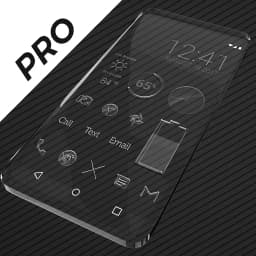
Glass Pack Pro - Clear Icons transforms your Android home screen with 3,800+ hand-crafted glass icons that blend elegance with transparency. Each icon features a shiny, modern glass aesthetic rendered in xxxhdpi resolution (192x192 pixels), ensuring crisp clarity on any device size.
The icon pack includes over 200 dark-themed wallpapers designed to showcase the glass icons beautifully. Because the icons are transparent, your chosen wallpaper shows through each one, creating a cohesive visual experience. You can browse and download wallpapers directly from the cloud, or use your own backgrounds—the glass design works equally well over dark or light surfaces.
Beyond icons, the pack comes with matching widgets to complete your setup. An analog clock widget, digital clock options, battery indicators, and weather widgets all follow the same glass aesthetic. System widgets and customizable KWGT widgets are included, giving you flexibility in how you arrange your home screen.
The app works with major Android launchers including Nova Launcher (recommended for the best experience and icon search support), Microsoft Launcher, Evie, Poco Launcher, ADW Launcher, Yandex Launcher, Action Launcher, Apex, and many others. You can apply icons either through the built-in Apply tab or directly via your launcher's personalization settings.
New glass icons are added regularly, and you can request additional icons through the Request tab if your favorite apps aren't yet included. The wallpaper chooser comes pre-installed for easy selection, and Muzei support lets you rotate through wallpapers automatically.
Note: Most Android launchers require manual setup to apply third-party icon packs. Long-press any icon in your launcher to customize it individually. If widgets stop updating, check your system or battery settings to ensure the app is exempt from battery optimization.
Glass Pack Pro - Clear Icons gives you a premium, cohesive design system for your entire Android interface without cluttering your phone.
Pros & Cons
Pros
- 3,800+ hand-crafted glass icons with xxxhdpi resolution for sharp clarity
- Transparent design lets your wallpaper show through each icon beautifully
- Includes matching widgets, clock options, and weather indicators in same aesthetic
- Works with Nova Launcher, Microsoft Launcher, and eight other major Android launchers
Cons
- Most Android launchers require manual setup to apply third-party icon packs
- Widgets may stop updating unless app is exempted from battery optimization
- Transparent glass design works best on dark wallpapers, limits light background options
- Icon requests filled manually by developer rather than through automated system
Related Apps

AlienGUIse
Desktop themes and manager for Windows — transform your system with 5 futuristic designs.

SharpKeys
Remap keyboard keys to launch apps, media controls, and custom commands on Windows.

RocketDock
Desktop launcher for Windows — quick access dock with customizable icons and positioning.

Custom Resolution Utility (CRU)
Display resolution utility: Create custom resolutions for your monitor with precise refresh rate control.

Lagguy Wallpapers
Lagguy
4K & HD wallpapers for Android — minimal, abstract, nature, AMOLED designs with lifetime access

Lock Screen OS
Apps Genz
Customize your lock screen with widgets, photos, and notifications. Replace Android's default lock screen.
Latest Articles

Best apps for AI task scheduling on desktop in 2026
Jul 9, 2026

Best apps for desktop customization in 2026 (Windows, macOS, Linux)
Jul 9, 2026
Best apps for home lab simplification on desktop in 2026
Jul 9, 2026

Best apps for horror streaming on desktop in 2026 (free and low-cost)
Jul 9, 2026

Best apps that make Linux a daily driver on desktop in 2026
Jul 9, 2026